Automating Business Processes: A Practical Guide for Modern Businesses
In today's fast-paced corporate environment, growing businesses face a common bottleneck: the weight of repetitive manual work. Teams spend hours copying data between spreadsheets, chasing approvals, and manually processing invoices. This pulls focus away from growth, strategy, and client service.
At its core, automating business processes means using technology to handle repetitive, rule-based tasks. By integrating artificial intelligence (AI), robotic process automation (RPA), low-code platforms, and smart workflows, modern organizations can completely transform their operations.
However, technology should always support broader business goals rather than simply automating everything for the sake of it. Strategic automation starts by streamlining what already works. At MBC Consultant, we help growing businesses optimize their financial and operational workflows, ensuring that technology serves as a true accelerator rather than a distraction.
What Is Business Process Automation?
Business process automation (BPA) uses software, applications, and advanced technology to execute recurring tasks or workflows without constant human intervention. Unlike basic macros or simple email alerts, modern BPA connects disparate enterprise systems, validates data, triggers approvals, and archives records autonomously.
How Business Process Automation Works
Effective automation follows a continuous improvement lifecycle:
1. Identify: Spot repetitive, high-volume tasks causing operational bottlenecks.
2. Redesign: Streamline the workflow by removing redundant steps before introducing software.
3. Automate: Deploy the right mix of AI, RPA, or workflow platforms.
4. Monitor: Track real-time performance metrics and error rates.
5. Improve: Continuously refine rules and logic to maximize output.
Business Processes That Can Be Automated
Virtually any structured, repetitive workflow can be optimized. Common examples include:
Invoice processing and accounts payable routing
Accounts receivable follow-ups and payment reminders
Payroll workflows and expense management
Financial reporting and ledger reconciliation
High-volume data entry and database syncing
Employee onboarding and document collection
Standardized customer communication and ticketing
Multi-tier approval workflows
Inventory tracking and stock reordering
Why Are Businesses Automating Their Processes?
Manual operations create invisible friction that drains company resources. According to insights from McKinsey & Company on automation, a significant portion of working hours across industries is spent on tasks that can be readily automated.
Organizations typically pursue automation to solve specific business pain points:
High volumes of repetitive manual work causing employee burnout.
Frequent human errors in data entry and financial calculations.
Slow, fragmented approval loops that stall operations.
Data duplication across disconnected software silos.
Poor organizational visibility into real-time performance.
6. Rising operational costs driven by administrative overhead.
Delayed reporting that hampers executive decision-making.
Benefits of Automating Business Processes
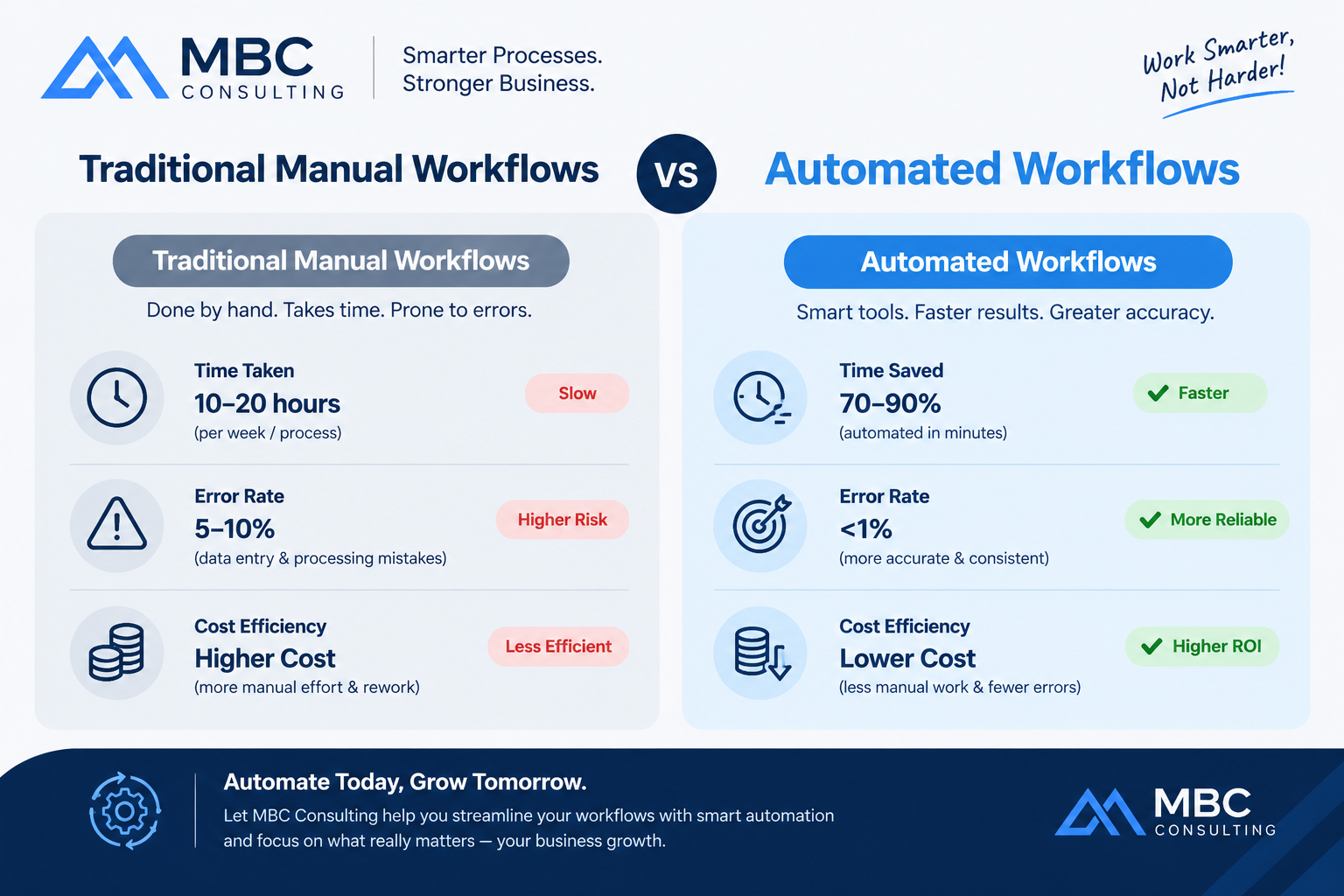
When implemented strategically, automation unlocks measurable enterprise value across multiple departments.
1. Reduce Manual and Repetitive Work
Automation lifts the administrative burden off your team. By letting software handle data entry and document routing, employees can pivot toward higher-value activities like strategic analysis, client relationship management, and product innovation.
2. Improve Accuracy and Reduce Human Error
Manual data handling is inherently prone to typos and oversights. In core functions like accounting, compliance reporting, and invoice processing, automated validation rules ensure data consistency and accuracy across every transaction.
3. Increase Operational Efficiency
Automation eliminates process bottlenecks. Workflows move instantly from one stage to the next, drastically shortening cycle times and accelerating service delivery.
4. Reduce Operating Costs
By optimizing how time and labor are allocated, businesses reduce operational expenditures. Automation is not about eliminating headcount; it is about maximizing organizational output without scaling administrative headcount linearly.
5. Improve Business Visibility
Modern platforms feed real-time data into centralized dashboards. This gives management immediate access to financial insights, key performance indicators (KPIs), and operational metrics.
6. Improve Customer and Employee Experience
Faster response times, instant approvals, streamlined onboarding, and reliable service delivery create a frictionless experience for both clients and internal staff.
Automating Business Processes With AI
Traditional automation follows strict "if-this-then-that" rules. Automating business processes with AI introduces cognitive capabilities that handle unstructured data, variability, and complex decision-making.
What Is the Primary Role of AI in Automating Business Processes?
Artificial intelligence empowers systems to interpret the world much like humans do. Its core roles include:
Analyzing large volumes of unstructured data.
Classifying documents (e.g., invoices, resumes, contracts).
Extracting key data points accurately.
Generating executive summaries and insights.
Identifying behavioural or financial patterns.
Supporting complex management decision-making.
Handling natural-language instructions to build or modify workflows.
AI Agents for Business Process Automation
Advanced AI agents operate autonomously across multi-step processes. Rather than executing isolated tasks, these agents can research market trends, draft financial reports, triage customer support tickets, and execute background operations with minimal human oversight.
What's the Difference Between AI, RPA, and Workflow Automation?
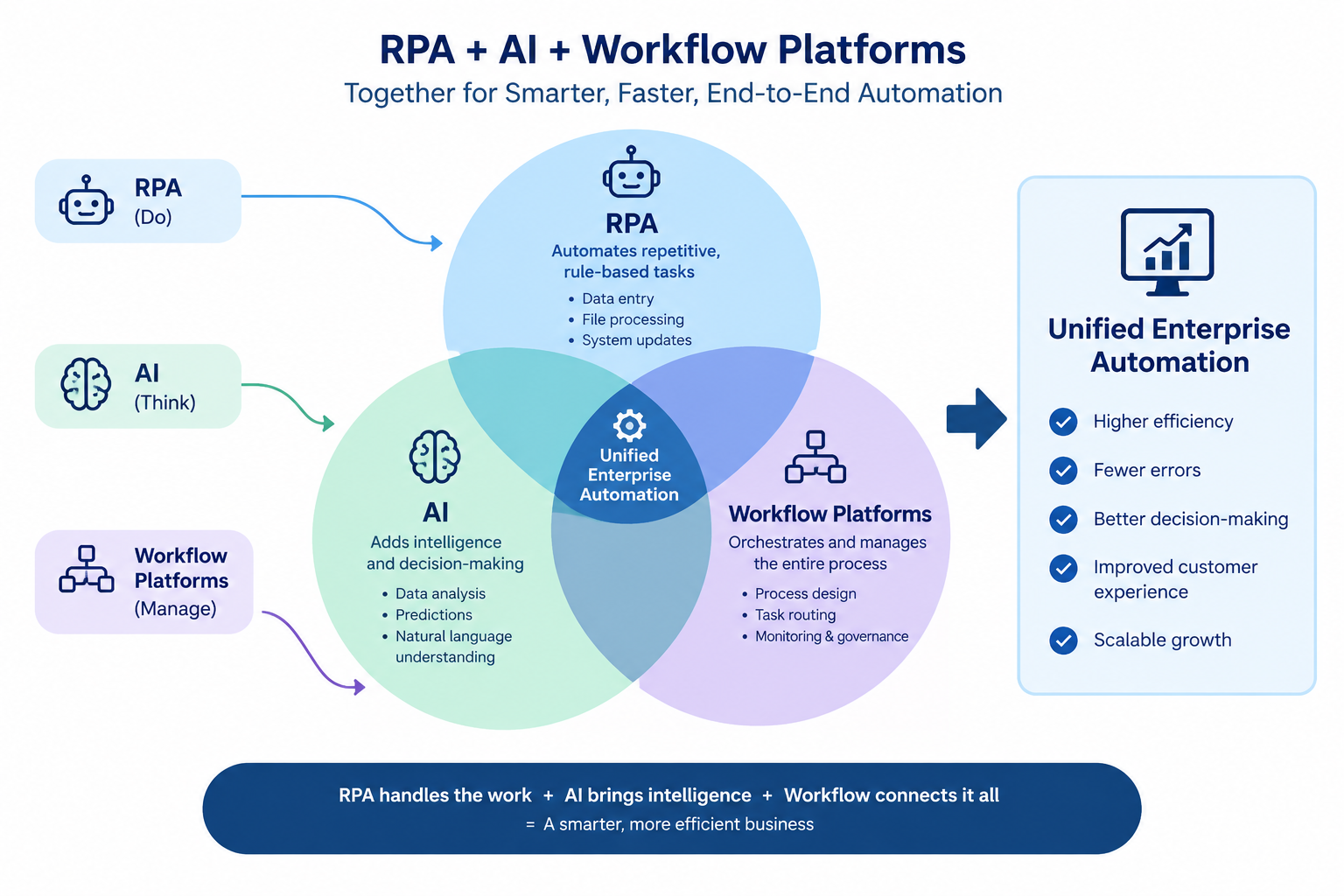
To build an effective automation strategy, it helps to understand how different technologies complement one another.
Technology | Main Function | Practical Example |
|---|---|---|
RPA (Robotic Process Automation) | Automates repetitive, rule-based tasks across software interfaces. | Copying customer data from an email invoice directly into an ERP system. |
AI (Artificial Intelligence) | Analyzes, predicts, generates, or interprets unstructured information. | Reviewing financial documents for anomalies or tax compliance risks. |
Workflow Automation | Connects multi-step business processes and routes approvals. | Multi-tier invoice approval workflow across department heads. |
AI Agents | Performs complex, multi-step tasks using autonomous reasoning. | Researching supplier pricing and preparing a consolidated variance report. |
Low-Code Platforms | Allows teams to build automated workflows with minimal custom coding. | Configuring a drag-and-drop employee leave request system. |
How AI Can Automate Business Processes from Words to Workflows?
One of the most exciting breakthroughs in modern technology is natural-language automation. Users no longer need complex code to set up operational rules. Instead, business leaders can describe their requirements in plain English.
For example, a manager can specify:
"When a supplier invoice arrives via email, extract the line items, verify the tax ID against our database, route it to the department head for approval if it exceeds $1,000, and record the transaction in our general ledger."
Advanced AI platforms ingest this natural-language prompt, translate it into logic blocks, connect the necessary software APIs, and deploy the workflow seamlessly.
Redesigning and Automating Business Processes
A golden rule in digital transformation is simple: Never automate a bad process. Automating an inefficient workflow only accelerates mistakes. Before deploying software, you must optimize the underlying process.
Step 1: Map the Existing Process
Document every single moving part. Identify who is involved, what systems are used, where data enters and exits, where approvals happen, and where bottlenecks occur.
Step 2: Identify Repetitive Tasks
Pinpoint tasks that are rule-based, high-volume, time-consuming, and prone to human fatigue.
Step 3: Redesign the Workflow
Strip away redundant approvals, unnecessary data fields, and redundant handoffs before writing any automation rules.
Step 4: Select the Right Technology
Evaluate whether your redesigned workflow requires simple APIs, RPA bots, AI interpretation, or a comprehensive low-code platform for automating business processes in manufacturing and service sectors.
Step 5: Test and Monitor
Run controlled pilot tests, establish robust exception-handling protocols, ensure strict data security compliance, and monitor performance continuously.
How to Automate Business Processes Step by Step
1. Identify the Business Problem: Define the exact friction point you want to eliminate (e.g., slow invoice turnaround).
2. Document the Existing Workflow: Create a visual flowchart of current manual steps.
3. Measure the Current Process: Benchmark key metrics such as processing time, cost per transaction, error rates, and approval delays.
4. Choose the Right Automation Technology: Match the complexity of the task with the appropriate tool (RPA, AI, or workflow software).
5. Build and Integrate the Workflow: Connect your core systems securely using robust APIs or integration middleware.
6. Test the Automation: Run trial transactions with edge cases to ensure the system handles errors gracefully.
7. Train Employees: Educate your team on how to interact with the new automated workflows and handle exceptions.
8. Monitor Results and Optimize: Review performance dashboards regularly to fine-tune speed and accuracy.
Automating Business Processes in Finance and Accounting
For accounting firms and corporate finance departments, automation is a game-changer. Manual bookkeeping and legacy reporting leave little room for strategic foresight. Integrating intelligent automation into finance unlocks profound improvements across key domains:
Automated Invoice Processing: Capturing, matching, and posting supplier invoices without manual keying.
Accounts Payable Automation: Streamlining approvals and scheduling timely vendor disbursements.
Accounts Receivable Workflows: Automating reminder sequences and cash application.
Automated Financial Reporting: Compiling trial balances, income statements, and balance sheets instantly at month-end.
Cash Flow Monitoring: Real-time visibility into cash inflows and outflows.
Budgeting and Forecasting: Using predictive models to generate accurate rolling forecasts.
Management Information Systems (MIS) Dashboards: Providing executives with clean, visual data feeds.
Payroll and Expense Workflows: Validating expense claims against company policy and executing direct payouts.
To build an agile financial engine, organizations frequently pair internal efforts with specialized outsourced accounting services and expert Virtual CFO services to oversee complex financial operations.
Automating Hybrid Business Processes With RPA
Many real-world operations are hybrid business processes, meaning they require a blend of rigid system execution and nuanced human judgment.
Consider an accounts payable exception workflow:
1. An invoice is received via PDF.
2. RPA extracts the text and populates the ERP.
3. AI checks the line items against historical purchasing patterns for anomalies.
4. If an anomaly is detected, the system routes the file to the finance team for manual review.
5. Once approved, the system records the transaction automatically.
This is the power of human-in-the-loop automation, combining machine speed with human oversight.
Automating Business Processes in Manufacturing and Operations
While operations vary across sectors, manufacturing and supply chain environments benefit immensely from structured workflows. Common applications include:
Inventory tracking and automated stock level alerts.
Purchase order generation and supplier management.
Production milestone approvals and warehouse operations.
Quality control logs and compliance reporting.
Data synchronization between floor sensors and ERP software.
According to research from Deloitte's insights on intelligent operations, supply chain automation significantly reduces lead times and inventory holding costs
Key Considerations When Automating Processes in a Service Business
When automating processes in a service business, a strategic consideration should be balancing efficiency with personal client touchpoints. Service businesses thrive on relationships. Key factors to weigh include:
Business Goals: Every automation initiative must solve a measurable operational problem.
Customer Experience: Never automate touchpoints that require genuine human empathy, custom consultation, or nuanced advisory.
Data Security: Safeguard sensitive financial data, client records, and payroll information with rigorous encryption and access controls.
System Integration: Ensure new automation tools communicate smoothly with your existing CRM, ERP, and accounting platforms.
Scalability: Design workflows that scale effortlessly as your client base expands.
Human Oversight: Clearly define where manual review checkpoints remain mandatory.
Common Challenges of Business Process Automation
A balanced approach requires acknowledging potential hurdles during implementation:
Initial Implementation Costs: Software licenses, setup, and custom integrations require capital investment.
Integration With Existing Systems: Legacy software can resist modern API connections.
Employee Adoption: Staff may resist change if they fear job displacement or find new tools complex.
Data Quality Problems: "Garbage in, garbage out"—poor foundational data leads to faulty automated decisions.
Security and Compliance Risks: Improper access rights can expose confidential corporate data.
Over-Automation: Trying to automate creative or highly variable human tasks unnecessarily.
Maintaining Automated Workflows: Systems require periodic auditing and updates as business rules evolve.
How to Choose the Right Business Process Automation Strategy
When designing your rollout, evaluate your initiative against a strict decision framework:
1. Business Objective: What specific metric are we trying to improve?
2. Process Complexity: Is the workflow simple and rule-based, or complex and variable?
3. Data Requirements: Does the process rely on structured spreadsheets or messy unstructured documents?
4. Existing Software: Can our current stack support the new automation layer?
5. Integration Requirements: Do multiple databases need to talk to each other in real-time?
6. Security Requirements: Does the workflow handle restricted financial or personal data?
7. Budget & ROI: Do expected time and cost savings outweigh deployment costs?
8. Human Involvement: Where must a human review step remain intact?
Business Process Automation for Growing Businesses
For startups and small-to-medium enterprises (SMEs), resources are finite. Rapid growth often strains internal administrative capacity. Implementing targeted workflow automation helps growing companies manage:
Surging transaction volumes without adding administrative overhead.
Rapidly scaling financial reporting and cash-flow visibility.
Tightening accounts payable and receivable cycles.
Streamlining employee expense reporting and management review.
How MBC Consultant Can Support Business Process Automation
Implementing automation doesn't mean you have to figure out every technical detail on your own. At MBC Consultant, we focus on what matters most to your bottom line: optimizing your financial workflows, reporting structures, and internal operations.
We bridge the gap between business strategy and execution by offering:
Financial process optimization and workflow auditing.
Accounting workflow improvement and cloud integration.
Advanced management reporting and MIS dashboards.
Strategic financial planning and analysis (FP&A).
Proactive cash-flow management and internal controls.
Process documentation and Standard Operating Procedure (SOP) development.
Comprehensive advisory services to prepare your business for scalable growth.
Ready to transform your operations? Partner with our team to identify inefficient financial workflows, streamline reporting, and build a more resilient business.
Schedule a Consultation with MBC Consultant
Frequently Asked Questions
What is automating business processes?
It is the use of software, AI, and workflow tools to execute recurring business tasks automatically, reducing manual effort and operational friction.
What are the benefits of automating business processes?
Key benefits include reduced human error, faster cycle times, lower operating costs, improved data accuracy, and greater real-time business visibility.
What is the primary role of AI in automating business processes?
AI handles complex cognitive tasks such as analyzing unstructured data, classifying documents, extracting key information, and supporting decision-making.
How does AI automate business processes?
By interpreting natural-language instructions, processing varied document types, recognizing patterns, and routing tasks autonomously through integrated software systems.
What is the difference between RPA and AI automation?
RPA automates fixed, rule-based tasks across structured systems, whereas AI interprets unstructured data, makes predictions, and adapts to variable inputs.
Which business processes can be automated?
Common candidates include invoice processing, accounts payable/receivable, payroll workflows, employee onboarding, data entry, and management reporting.
What processes should not be automated?
Processes requiring deep human empathy, creative strategy, complex crisis management, or nuanced relationship-building should remain human-led.
How can small businesses automate their processes?
Small businesses can start by using cloud-based accounting integrations, low-code workflow apps, and automated invoicing tools to eliminate daily administrative drag.
Is business process automation expensive?
Initial investments vary, but modular low-code tools and scalable software make automation accessible for businesses of nearly any size, yielding rapid return on investment.
How can automation improve accounting and financial processes?
Automation accelerates month-end close, eliminates manual data entry errors, streamlines invoice routing, and delivers real-time financial dashboards for executive insight.